Internal Modes Basics
Initialize InternalModesSpectral, compute hydrostatic and fixed-frequency modes, and repeat the workflow for a realistic LatMix profile.
Source: Examples/Tutorials/InternalModesBasics.m
Initialize InternalModesSpectral from an exponential profile
This tutorial shows the minimum workflow for computing and plotting
vertical modes with
InternalModesSpectral.
The same overall pattern also appears in
InternalModesWKBSpectral,
InternalModesAdaptiveSpectral,
InternalModesDensitySpectral,
and InternalModesFiniteDifference.
We start from the standard exponential stratification
\[N^2(z) = N_0^2 e^{2 z / b},\]sample the implied density profile on a depth grid, and initialize the spectral solver on a denser output grid for plotting.
g = 9.81;
N0 = 5.2e-3;
b = 1300;

zIn = linspace(-5000, 0, 500).';
zOut = linspace(zIn(1), zIn(end), 1024).';
rho = 1025 * (1 + (b * N0^2 / (2 * g)) * (1 - exp(2 * zIn / b)));

im = InternalModesSpectral(rho=rho, zIn=zIn, zOut=zOut, latitude=33, nEVP=257);
Compute the hydrostatic modes
The simplest first solve is the hydrostatic call
modesAtFrequency,
which uses omega = 0 as the starting point.
[F, G] = im.modesAtFrequency(0);

figure(Color="w", Position=[100 100 980 360])
tiledlayout(1, 3, TileSpacing="compact", Padding="compact")

nexttile
plot(sqrt(im.N2), im.z, LineWidth=2)
xlabel("N(z) (rad s^{-1})")
ylabel("z (m)")
title("Exponential profile")
grid on

nexttile
plot(F(:, 1:4), im.z, LineWidth=1.5)
xlabel("F_j(z)")
title("Hydrostatic F modes")
grid on

nexttile
plot(G(:, 1:4), im.z, LineWidth=1.5)
xlabel("G_j(z)")
title("Hydrostatic G modes")
grid on
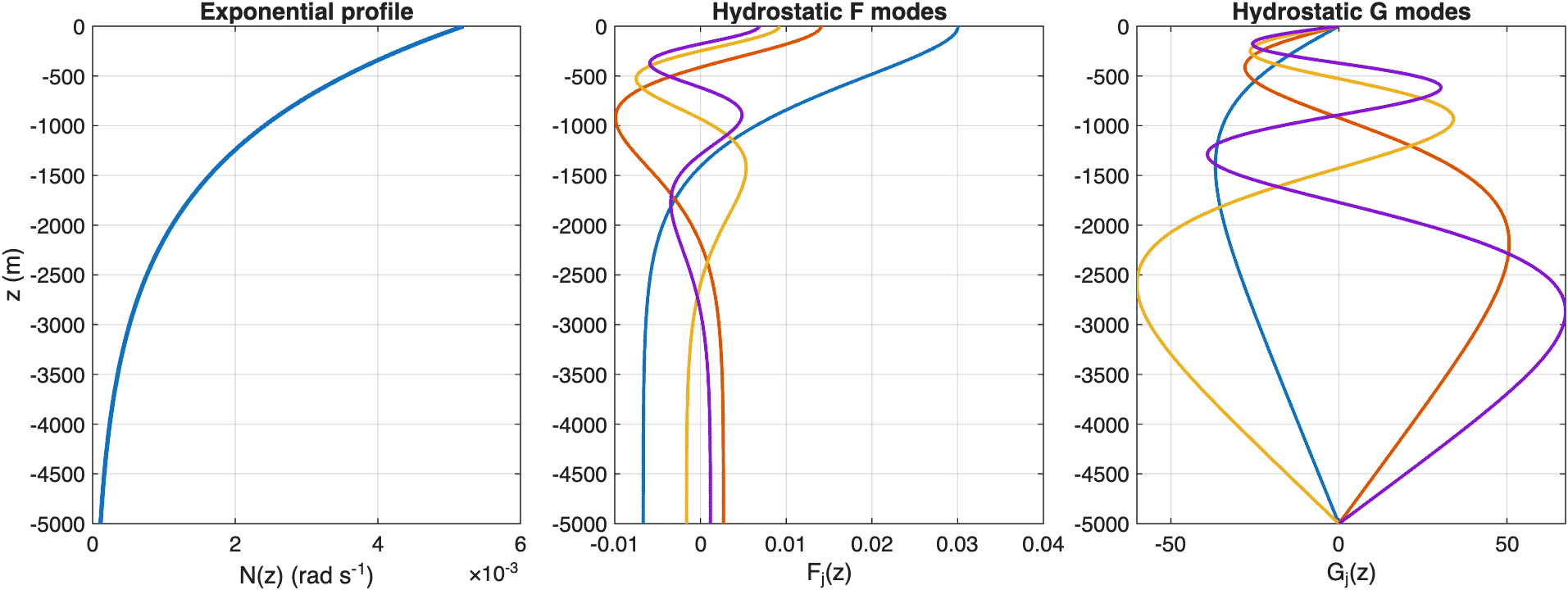
The hydrostatic solve gives a clean first look at the leading vertical modes for the standard exponential stratification.
Compute modes at a nonzero frequency
To move away from the hydrostatic limit, choose a representative
frequency between f0 and the largest buoyancy frequency in the water
column.
The companion fixed-wavenumber problem is also available through
modesAtWavenumber,
which returns [F, G, h, omega] for a chosen horizontal wavenumber k.
omega = im.f0 + 0.35 * (max(sqrt(im.N2)) - im.f0);
[F, G] = im.modesAtFrequency(omega);

figure(Color="w", Position=[100 100 980 360])
tiledlayout(1, 3, TileSpacing="compact", Padding="compact")

nexttile
plot(sqrt(im.N2), im.z, LineWidth=2)
xlabel("N(z) (rad s^{-1})")
ylabel("z (m)")
title("Exponential profile")
grid on

nexttile
plot(F(:, 1:4), im.z, LineWidth=1.5)
xlabel("F_j(z)")
title(sprintf("F modes at \\omega = %.2f f_0", omega / im.f0))
grid on

nexttile
plot(G(:, 1:4), im.z, LineWidth=1.5)
xlabel("G_j(z)")
title(sprintf("G modes at \\omega = %.2f f_0", omega / im.f0))
grid on
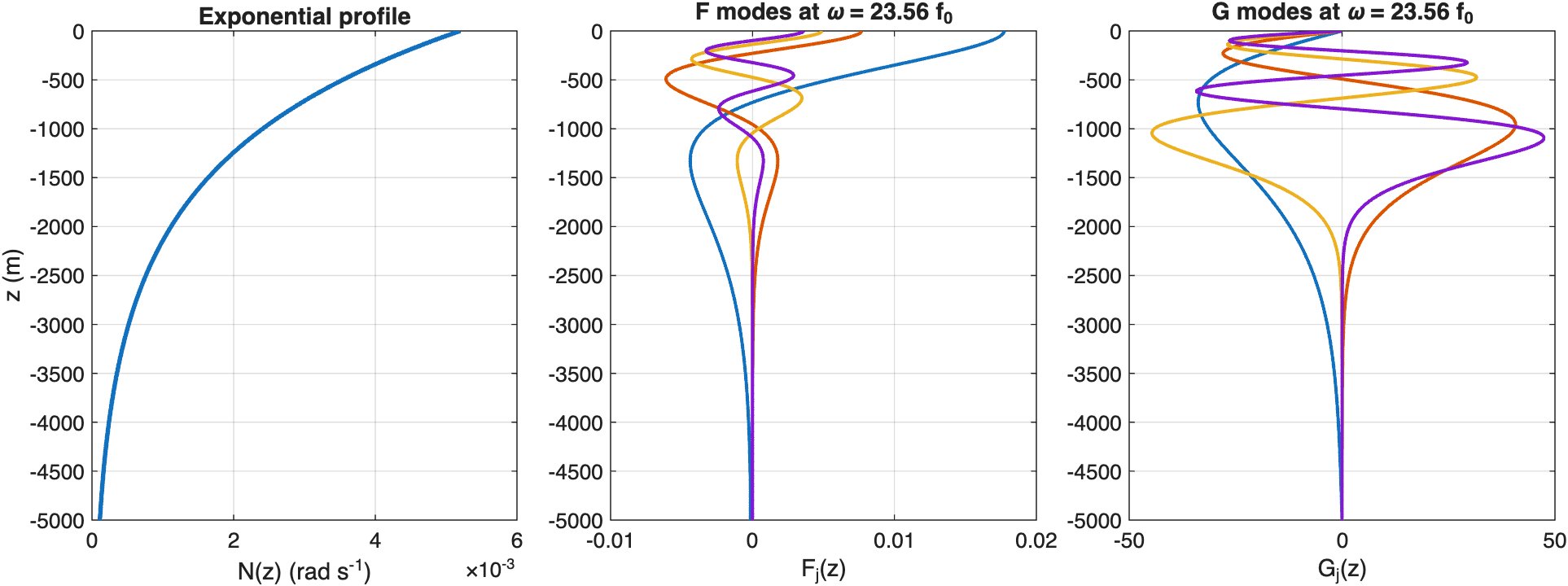
Choosing a nonzero frequency shifts the modal structure while keeping the same InternalModesSpectral workflow.
Compute modes for a realistic LatMix profile
The same solver can be initialized directly from a gridded observed profile. Here we load the first stored Site 1 LatMix profile that ships with the examples.
scriptDir = fileparts(mfilename("fullpath"));
latmixData = load(fullfile(scriptDir, "..", "SampleLatmixProfiles.mat"));

rhoLatMix = latmixData.rhoProfile{1};
zLatMix = latmixData.zProfile{1};
zOutLatMix = linspace(zLatMix(1), zLatMix(end), 1024).';

imLatMix = InternalModesSpectral(rho=rhoLatMix, zIn=zLatMix, zOut=zOutLatMix, latitude=latmixData.latitude, nEVP=257);
[F, G] = imLatMix.modesAtFrequency(0);

figure(Color="w", Position=[100 100 980 360])
tiledlayout(1, 3, TileSpacing="compact", Padding="compact")

nexttile
plot(imLatMix.rho, imLatMix.z, LineWidth=2)
xlabel("\rho(z) (kg m^{-3})")
ylabel("z (m)")
title("LatMix density profile")
grid on

nexttile
plot(F(:, 1:4), imLatMix.z, LineWidth=1.5)
xlabel("F_j(z)")
title("LatMix hydrostatic F modes")
grid on

nexttile
plot(G(:, 1:4), imLatMix.z, LineWidth=1.5)
xlabel("G_j(z)")
title("LatMix hydrostatic G modes")
grid on
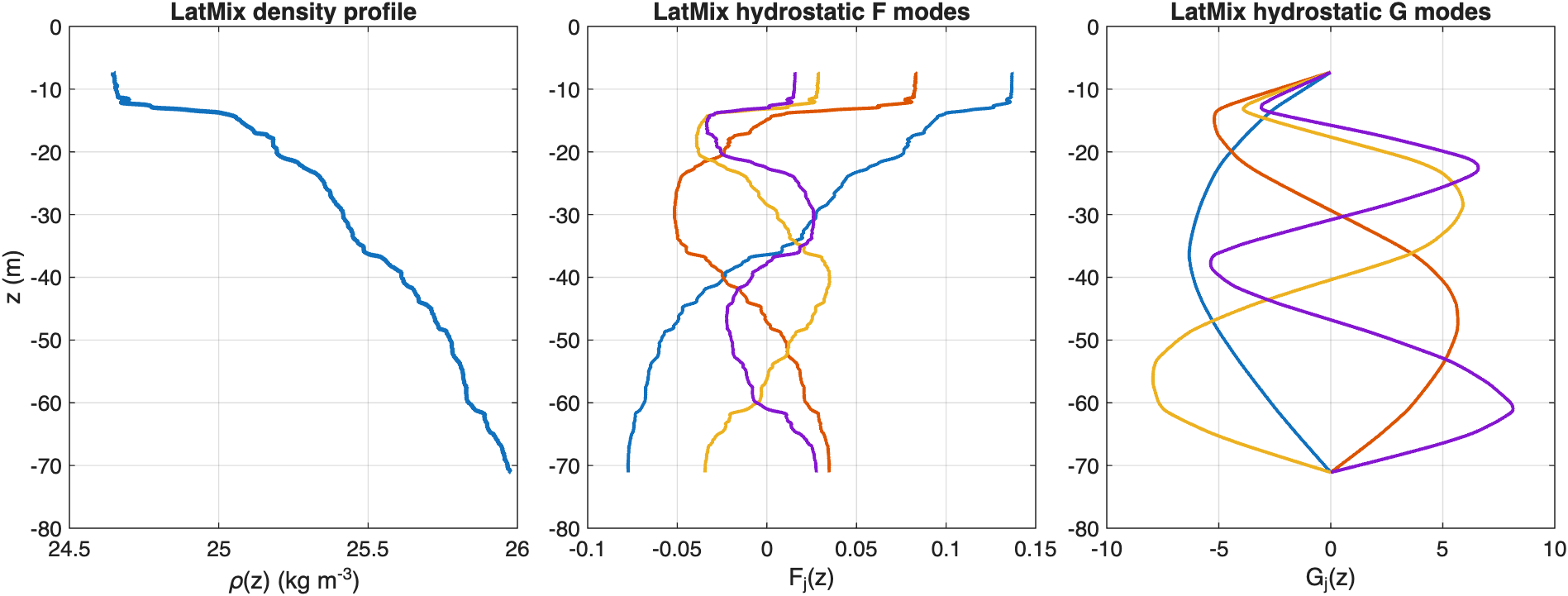
InternalModesSpectral works directly on the realistic LatMix profile and returns the leading hydrostatic modes on the requested output grid.
Choose the solver to match the profile
This LatMix density profile is not monotonic, so
InternalModesWKBSpectral
is not a good choice for this case. The depth-coordinate
InternalModesSpectral
solver still works directly on the supplied profile, which makes it a
convenient default for realistic profiles like this one.